Brad BourqueGearDec 7, 2025 8:00 AM
The Best Printers for Home and Office
It's a boring tool, but you need one. Here are the best home printers we have tested, from ink tank to lasers.CommentLoaderSave StorySave this storyCommentLoaderSave StorySave this story
Everybody prints. At least everyone I know. Yet as digital tickets and phone camera scanning become increasingly common, more homes are operating without a printer. For those who do need to print stuff from time to time or who just moved to a home office and really need a workhorse, I've got you covered.
In addition to writing for WIRED as a freelancer, I have a side hustle selling trading cards online. I'm printing packing slips, shipping labels, and even scanning cards on a daily basis. A printer is a commonly used tool in my life, so I can understand how frustrating it is when they don't work right.
I've spent hours printing out countless labels, slips, coloring book pages, and full-color photos of my dog on every printer I could get my hands on. Below are my favorites based on their printing quality, cost efficiency, and how often they gave me a headache. While I prefer laser printers for their ease of use and consistency, ink-tank options are quickly becoming more appealing, and I have great options for both, as well as your classic ink-cartridge-based devices.
Looking for more of the best home office gear? Be sure to check out our guides to the Best Computer Monitors, Best Standing Desks, Best Office Chairs, and Best Laptops.
Updated December 2025: We've added a thermal label printer and updated honorable mentions and related accessories.
Ink or Laser
AccordionItemContainerButtonLargeChevron
Before anything else, you'll have to decide between ink and laser. I'll get into the details when it comes to each model, but the most important consideration is paper type, because it’s a limitation rather than a benefit. Laser printers use heat in the bonding process, which means if you regularly print on windowed envelopes or photo paper, you'll need to either use an ink printer or change to a thermally safe alternative, which can be cost prohibitive if you print a lot.
Inkjets are the most common flavor of home printer, and they work like you might expect, by boiling ink until it splatters through a series of tiny holes. You didn't expect that? Me neither! Pretty exciting stuff.
Inkjet printers come in two flavors, with either prefilled cartridges or built-in tanks. The latter is quickly becoming more popular thanks to better pricing, more convenience, and a massive reduction in wasted plastic. If you're buying a new printer in 2025 you should opt for an ink tank, if not a laser printer. They're a little more work to setup and maintain, since you have to keep the tanks topped off, and they should remain in one place on a flat surface to avoid leaks. I can't imagine many situations where a printer would be constantly moving and tilting, but it's a consideration.
You thought InkJets were cool? Laser printers work by blasting a tube full of dried plastic particles, then fusing them to the paper with heat. They tend to cost more upfront, but the cost per page is overall much lower. Where a $20 ink cartridge might print 200 pages, a $60 toner cartridge could print 2000. They tend to be a lot faster than inkjet printers, and you don't have to worry about them drying out. Plus, the pages come out of the printer nice and warm, and you can't really put a price on that.
There are also thermal printers, which are commonly used for receipts or shipping labels. Instead of filling the printer with ink and depositing it onto a surface, they apply heat in precise patterns to special paper, allowing you to print text and images in low resolution, and typically in one color. If you print shipping labels or simple stickers at home, these can save you a lot of time and ink cost, but they have more limitations.
Laser printers are my preferred type, as long as your paper type and budget can support them, but most home users will be happy with an ink tank printer.
Connectivity
AccordionItemContainerButtonLargeChevron
While Wi-Fi is increasingly common, especially on high-end printers, it isn’t a given. If your home has a dedicated desktop, you can often plug in the printer through USB and share the connection over the network, but otherwise you may need to find a spot with an Ethernet cable. If you don’t have a desktop or a convenient spot next to the router, Wi-Fi will make your life a lot easier.
You'll also want to keep an eye out for different interface options. Basic models may have no screen at all, or a single line of dot-matrix characters. Upgrades often include a color LCD for clearer error messages, or even a touchscreen for advanced configuration without an app. I generally find these are most important during the initial setup, and become less useful over time.
The exception here is on machines with a document feeder, where a good interface can save you time shuffling through settings. Particularly in situations where you make a lot of copies, a touchscreen with proper presets and options
Copy and Scan
AccordionItemContainerButtonLargeChevron
I can't tell you definitively whether you need a scanner, but if you've used the feature in the last two years, and your phone camera hasn't sufficed, it's worth the upgrade. You don't want to have to shop for a standalone scanner, or buy an entirely new printer just to make copies twice a year. Most models come in scan-ful and scan-less varieties that are otherwise identical, so it shouldn’t complicate the decision much.
Flatbed scanners are the most common, and are often found on multi-purpose home printers. A flatbed is more than sufficient for uploading occasional forms, and it's preferable for photos, with typically higher resolution, and no fear of bending precious memories.
Document feeders are found on higher-end and small business-focused printers, and are really only necessary for situations where you’re regularly scanning stacks of pages. If you have customers filling out stacks of signed forms, or you're making copies of handouts and need them collated, it's worth upgrading.
- Photograph: Brad Bourque
 Photograph: Brad Bourque
 Photograph: Brad Bourque
 Photograph: Brad Bourque
ChevronChevron
Epson
EcoTank ET-2980
$330 $259 (22% off)
Amazon
$330 $280 (15% off)
Staples
Setting up and maintaining an ink tank printer adds a few extra steps, and I was a little wary of them at first. This Epson EcoTank ET-2980 was the most straightforward and nonthreatening I tested. The ink bottles mount right into keyed holes, so you can't mix them up, with no extra drips or dribbles, and there were no extra bits to install or configure, just a onetime scan sheet to check the alignment. It was also the easiest to secure if I needed to move it without getting ink everywhere.
Print quality is excellent, and slower than the laser printers, but quick enough for most home use. It includes a flatbed scanner, making it one of the best equipped printers for the price, particularly when you take into account the savings from refillable ink. My only minor complaint here is that it uses a vertical feeding paper tray from the rear, which means a lower 100 page print capacity. The upside is that means better paper compatibility, since the pages don't have to make a complete turn. For homes that print and scan occasionally, and want something flexible and inexpensive to maintain, this is my pick.
SpecsPrint TypeColor Ink TankConnectivityWi-Fi, USBPaper HandlingInput: 100, Output: 30Photograph: Brad Bourque
Brother
HL-L3280CDW
$345
Amazon
$300
Staples
As long as you don't need a scanner, I'd check out the Brother HL-3280CDW. It printed slower than the black-and-white model, but still fast for the group, with a nice crisp detail level, and it isn't too noisy. The touchscreen makes setup and adjusting options straightforward, and I was able to set it and forget it.
This no-frills printer is great for mostly black and white with occasional color printing, with a fairly compact footprint and a second manual feed paper tray. Photos tend to come out much richer and more detailed on inkjet printers, but color laser printers still do a great job at faster speeds, particularly for colorful handouts or simple brochures.
SpecsPrint TypeColor LaserConnectivityWi-Fi, Ethernet, USBPaper HandlingInput: 250, Output: 150
- Photograph: Brad Bourque
Brother
HL-L2460DW
$180 Amazon
$160 Staples
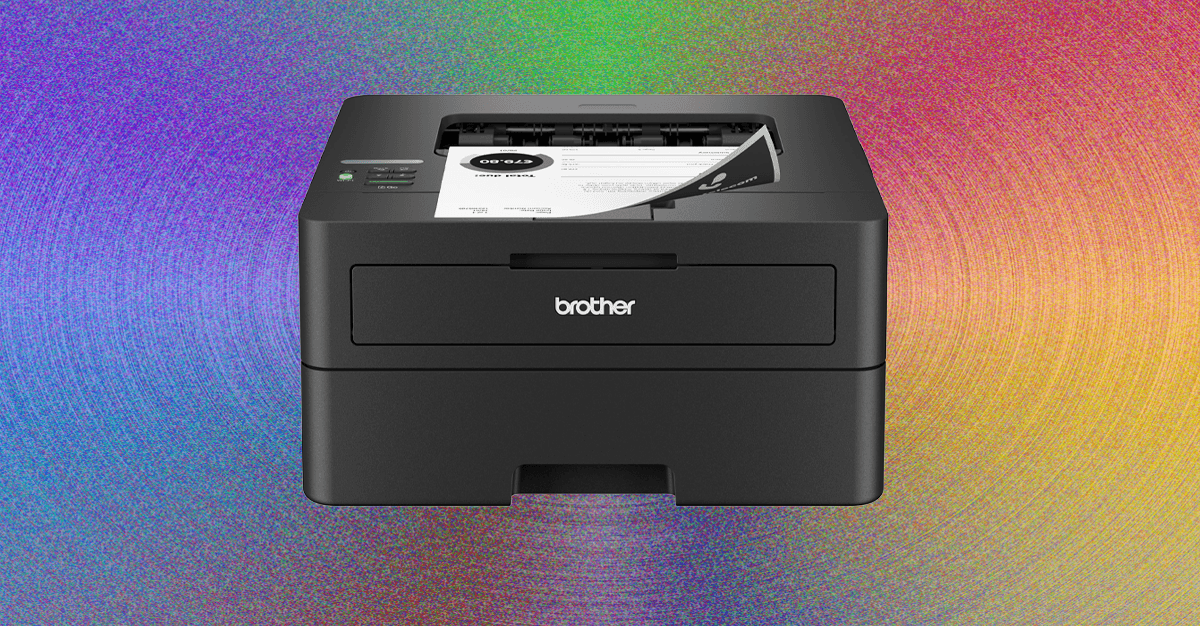
Even though the Brother HL-L2460DW runs nice and quiet, it was one of the faster printers in my testing, making it a great choice for a home office printing out invoices, or a classroom that needs lots of handouts in a hurry. If you’re printing out dozens of pages per day, all of them in black and white, and never scanning, you'll save a lot of cash going with this laser option.
Setup isn't entirely intuitive. There's only a single line readout, and limited buttons for entering a Wi-Fi password, but I only had to grapple with it once. Once it’s running, it requires little to no upkeep or changing settings. It's fast, cheap to run daily, fits cleanly onto any shelf, and just needs a power cable.
SpecsPrinter TypeBlack and White LaserConnectivityWi-Fi, Ethernet, USBPaper HandlingInput: 250, Output: 100 - Photograph: Brad Bourque
HP
Color LaserJet Pro MFP 3301sdw
$539 $439 (19% off) Amazon
$490 Staples
The HP Color LaserJet Pro MFP 3301sdw is probably more feature-packed than most casual users would need, but if I showed up to work one day and it was near my desk, I'd say Santa came early. This would be a great fit for a home office where multiple people are often printing out full color promotional sheets or invitations.
It's fully connected, with Dual-Band Wi-Fi, Ethernet, and USB, so you could park this anywhere in your small office and have the whole team printing. It's fast enough I won't be waiting on someone else to finish their job, and quiet enough I wouldn't be mad to sit nearby.
My only minor complaint here is that the document feeder up top likes to crunch documents if you don’t get the holders positioned exactly right, so just make sure to use the flatbed for anything important.
SpecsPrint TypeColor LaserConnectivityWi-Fi, Ethernet, USBPaper HandlingInput: 250, Output: 100
- Photograph: Brad Bourque
HP
OfficeJet Pro 9125e
$310 $210 (32% off) Amazon
$300 $210 (30% off) Staples
While I think Ink Tank and laser printers offer a better value and user experience, I can understand feeling more comfortable dealing with classic ink cartridges. This upgraded HP OfficeJet Pro 9125e is the newer model of the printer that powered my business for the last year or so. It's fully featured, with both a flatbed and document scanner, and it was one the speedier non-laser printers I tested with full color printing.
It also boasts the widest support for paper types and sizes on the list, although it doesn't always grab the right number of pages when working with thicker stock, something I noticed on the older version as well. With an easy setup process, minimal software needed, and wide feature set, this would be a great option for people who don't want to think about their printer often, they just want it to work when they need it.
SpecsPrint TypeColor Ink CartridgeConnectivityWi-Fi, Ethernet, USBPaper HandlingInput: 250, Output: 100 - Photograph: Brad Bourque
Munbyn
RW405B Thermal Printer
$220 $170 (23% off) Amazon
While thermal printers won't really work for documents or photos, they're excellent for printing shipping labels and simple stickers without having to worry about ink or toner. Munbyn isn't exactly a household name, but I started using the 405B to print return labels, and it has quickly become a common tool in my household tasks. The round 2-inch stickers are great for labeling food jars or storage containers, and I like to slap them on snack bags or wrapped sandwiches when heading to a party or potluck.
This upgraded model has a user-replaceable printhead, even though the one inside is rated for almost a million prints, and includes a spool, which you'll want anyway for keeping your label rolls tidy. It works best via Bluetooth, and I use the Android app for most of my stickers and labels, thanks to the large library of templates and extra assets.
SpecsPrint TypeThermalConnectivityBluetooth, USBMax Size4" x 6"
Related Accessories
Scotch Pro TL906 Laminator: This simple laminator heats up quickly and runs smoothly and quietly, although I find it works better using the 5mm setting, even with 3mm pouches. This is a good pick for occasional laminating at home, but might not be quick enough for consistently big projects.
Other Printers
HP LaserJet M209d ($130): While HP’s minimalist black and white laser printer might be wallet-friendly, it's quite noisy and lacks some crucial connectivity. Even just adding Ethernet would sweeten the pot here a lot, but if you want something basic for USB-only use, it'll get the job done.
HP Smart Tank 5101 ($260): Unlike with Epson’s ink-tank printer, setup for the HP was involved and messy, and I ended up staining my fingers multiple colors in the process. I wasn't stoked by the print quality, and in addition to frequent random printer noises, it occasionally let out a high frequency beeping.
Comments
Back to topTriangle

Brad Bourque is a contributor for WIRED with a focus on computing hardware and peripherals. He’s a lifelong Oregonian and an avid Portland Thorns and Timbers supporter. On his days off, you can find him riding his ebike around Portland or taking his dog to the park. ... Read MoreContributorTopicsShoppingbuying guidesAccessories and PeripheralsprintersPapercomputingRead More

The Best Ergonomic Mouse to Keep Wrist Strain at BayWrists cramping? Skip the gaming mouse and snag one of these WIRED-tested ergonomic options instead.

The Best Computer Monitors to Upgrade Your Desk SetupThe Gear team spends countless hours in front of displays while writing for you. So we reviewed those too (including a portable screen).

Breathe Easy—We Found the Best Air PurifiersProtect your home against dust, pets, allergies, and more with air purifiers tested firsthand by WIRED.

The Best Computer Speakers for Jamming Out in Your Home OfficeThese WIRED-tested computer speakers, from stereo speakers to surround sound, will suit any budget.

Our Experts Tested 5 Bread Makers for the Perfect LoafFrom gluten-free to sourdough and beyond, swap store-bought bread for freshly baked with these convenient machines.

Get Clicky With Our Favorite Custom Mechanical KeyboardsWe’ve typed thousands of words to help you find the ideal clacky—or
thocky—mechanical keyboard for your refined taste.

These Are the Only MagSafe Phone Grips You Should BuyTake the strain off with these comfortable, durable, and lightweight smartphone grips.

The Best Coffee Pod Machines for Hot and Cold Brew—FastPod coffee makers are a convenient way to get caffeinated. Of the ones we've tried so far, the Bruvi BV-01 is our top pick.

The Best TV Antennas We've TriedPlug into free HD TV with these convenient and affordable indoor antennas.

The Best Tablets for Work and PlayWe’ve tested all the top slates, from Apple’s iPads to Android and Windows devices, and rounded up our favorites.

The Best Gaming Mouse for Every Kind of GamerFrom wired to wireless to ultralight, we've tested dozens of gaming mice to find the best for work, your next MMO, and everything in between.

The Best Home Arcade Machines for Retro GamersRewind to the classic games of the ’70s and ’80s with a WIRED-tested home arcade machine.
Wired Coupons

Squarespace Promo Code
Exclusive 10% Off Squarespace Promo Code

Dell Coupon Code
10% off Dell Coupon Code for New Customers

Samsung Promo Code
Samsung Promo Code: 10% off TVs

Canon Promo Code
10% off Canon promo code with upgrade

DoorDash Promo Code
$25 off $25+ DoorDash Promo Code for New Customers

LG Promo Code
LG Promo Code: 20% Off Your First Order



Comments (0)