

4 ways to refine your content in Flow
Nov 25, 2025
· Facebook LinkedIn Mail Copy linkGet more creative control in Flow with new refinement and editing capabilities.
Anika Ahluwalia Product Manager, Google Labs Read AI-generated summaryGeneral summary
Flow now gives you more creative control when refining and editing content. You can generate and edit images with Nano Banana Pro, prompt by doodling, and insert or remove objects. Plus you can adjust camera motion with reshoot.
Summaries were generated by Google AI. Generative AI is experimental.Bullet points
- "4 Ways to Refine Your Content in Flow" shares new features for better creative control.
- Generate and edit images using simple prompts with Nano Banana Pro for pro-grade controls.
- Draw or annotate directly on images to guide Flow, skipping separate editing apps.
- Insert or remove objects from clips without changing anything else; object removal is experimental.
- Adjust camera position and motion in generated videos for different perspectives and angles.
Basic explainer
Flow is an app that helps people make cool videos. The app now has new tools that let you change pictures and videos easier. You can draw what you want, add or remove things, and even change the camera angles. These new features give you more control to make your videos awesome.
Summaries were generated by Google AI. Generative AI is experimental.Explore other styles:
Facebook LinkedIn Mail Copy linkWe built Flow to help creatives bring their ideas to life, and so far we’ve seen over 500 million videos created since launching in May. Along the way we’ve heard your feedback: you want more precision and control, with both images and videos. Over the past few weeks, we’ve introduced new features to help give you more creative control in Flow with new refinement and editing capabilities.
Here are four ways you can refine and edit your content in Flow:
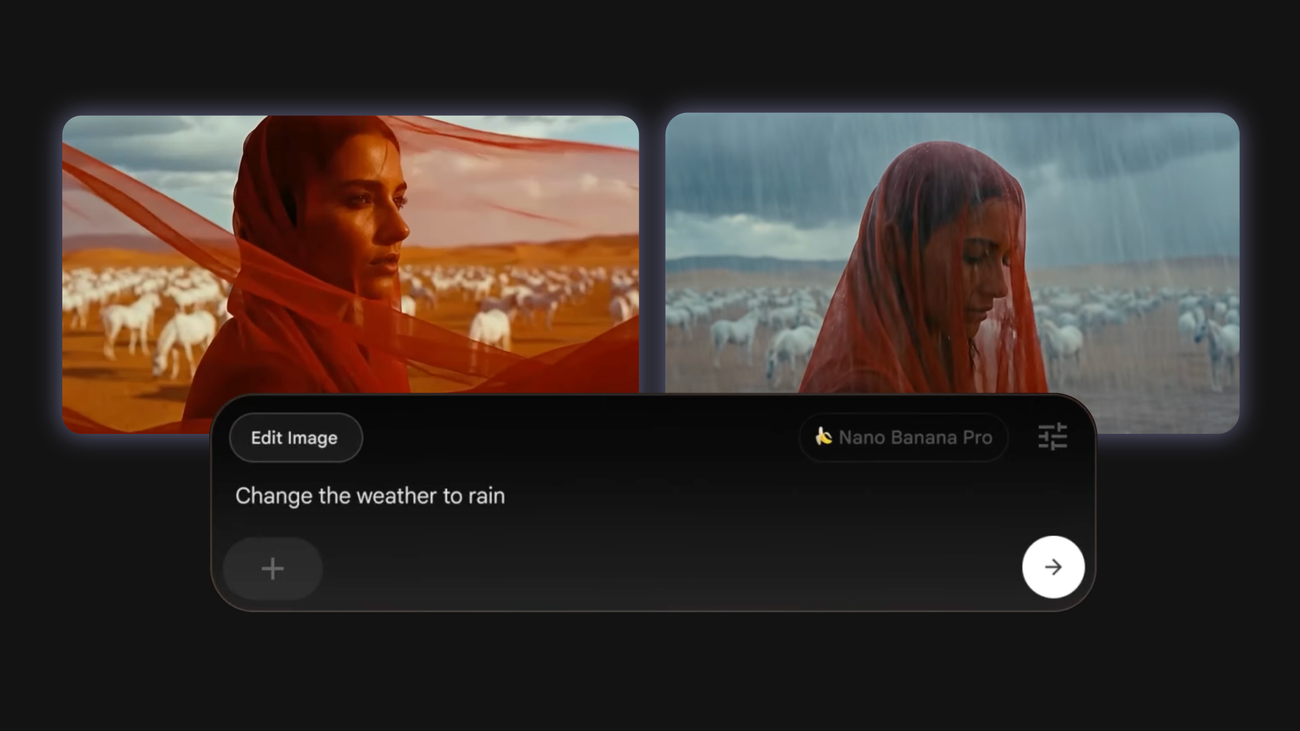
1. Generate and edit images with Nano Banana Pro.
In Flow, you can use images to serve as the characters, subjects and starting points for your clips. These might be images you upload, or ones you create in Flow with our new “Images” tab.
This new dedicated workspace for generating and refining images is powered by Imagen and Nano Banana for free users, and subscribers also have access to Nano Banana Pro, our newest state-of-the-art image model which provides improved professional-grade controls like depth of focus, lighting and color grading.
With simple prompts, you can change a character's outfit or alter a pose, camera angle or lighting without re-rolling the entire scene. You can also blend elements from multiple reference images to create your perfect frame while preserving the critical details of your ingredients.
2. Prompt by doodling.
Instead of wordsmithing the perfect prompt, you can draw or annotate on an image, Flow understands your doodles and incorporates them into your final frame. You can doodle directly in Flow instead of turning to a separate editing app.
3. Insert and remove objects.
We’ve heard feedback that sometimes when creating in Flow, you might want your clip to stay exactly the same, except for one missing piece — or one thing you don’t love. Tap the pencil icon on any clip to insert objects directly into videos or remove elements, without changing anything else. Object removal is rolling out next month and will be experimental.
4. Adjust your camera motion with reshoot.
Sometimes, the camera angle or motion doesn’t come out exactly as you’d imagined, or you want to play around and see how clips look from different perspectives. We introduced a new feature to help adjust the camera position, orbit, or move the “dolly” in any of your generated videos. The Camera Adjustment feature works best for clips that don’t currently include camera motion.
We hope these capabilities help you create even more dynamic content in Flow — with more precision and control.
POSTED IN:
Login to comment
To post a comment, you must be logged in. Please login. Login
Comments (0)